

11 Popular Auto Repair Shop Management Software (2026)
%20(1).png)
February 4, 2026
15 min read
The best auto repair shop management software depends on how you want to run your shop.
Some auto repair shop owners are comfortable being on-site, managing everything directly. Others want full visibility without being physically present. That difference changes what “best” looks like. For example, cloud systems make more sense if you want remote access and easier scaling.
Because of this, it’s important to look at how the software fits your workflow, your team’s habits, and how you plan to grow over the next few years. With that context, let’s look at the most commonly used auto repair shop management software based on how they fit different shop sizes, workflows, and goals.
Which software is right for your automotive repair shop?
There isn’t a single answer. The choice depends on how your shop operates today -
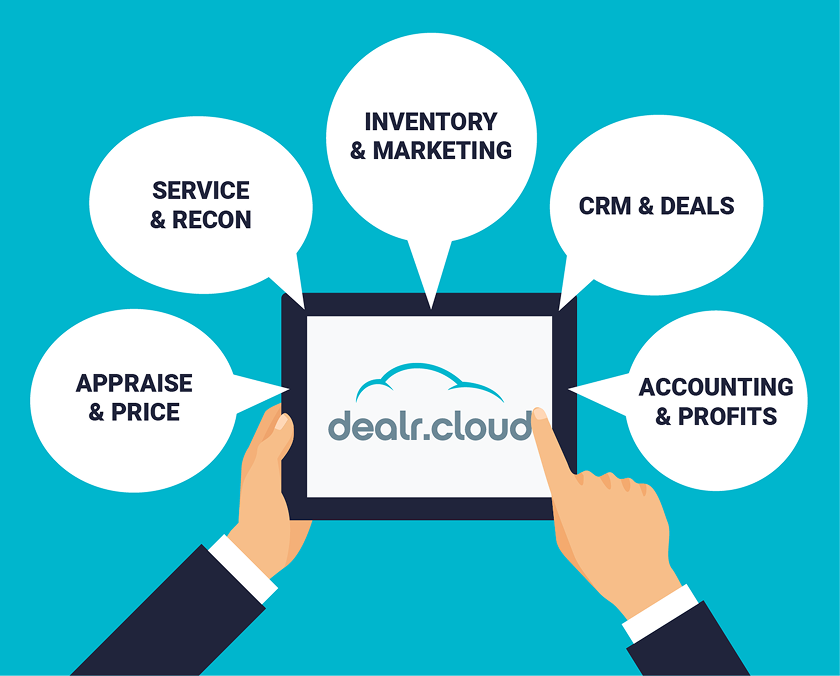
1. If you want service, recon, inventory, and accounting in one system → dealr.cloud.
Choose this when you don’t want data split across tools. It makes sense if repair costs need to reflect directly in vehicle pricing and deal profitability. Independent dealerships with repair shops run better when recon, service, and sales operate in one flow instead of being split across systems.
2. If you want a familiar system with strong repair data → Mitchell 1.
Choose this if your team already knows it and relies on labor guides and diagnostics.

3. If you want fast, cloud-based workflows with parts and job visibility → Tekmetric.
Choose this when speed matters on the floor. It fits shops that want quick estimates, parts sourcing, and real-time job tracking without being on-site.
4. If you want scheduling, messaging, and simple daily operations → Shopmonkey.
Choose this if your focus is keeping work orders moving and customers updated, without needing deeper inventory or multi-location control.
5. If you’re growing and want more structured workflows → AutoLeap.
Choose this when job volume is increasing and you need more consistency across inspections, approvals, and reporting.
6. If your shop runs on detailed processes and configurable workflows → Shop-Ware.
Choose this when you want to control how work moves through each stage. It fits process-heavy shops that are okay with longer setup.
7. If you want something simple to get started → Shop Boss or ARI.
Choose these if you’re early-stage or running a small operation. They work when simplicity matters more than depth.
8. If you’re in diesel or fleet repair → Fullbay.
Choose this if your work involves longer repair cycles, asset tracking, and compliance requirements specific to heavy-duty jobs.
Detailed Review: Popular Auto Repair Shop Management Software
The overview above gives a quick snapshot. Next, we’ll go deeper into how each tool works in day-to-day shop operations.
1. dealr.cloud
Best For: Independent dealers needing service, recon, accounting, and inventory tied together from buy to sold.
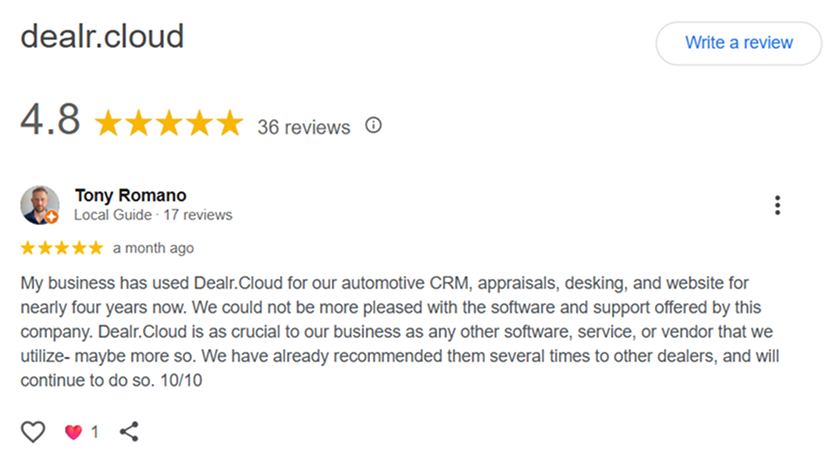
dealr.cloud is not a stand-alone auto repair shop tool. It connects inventory, service, sales, and accounting into one DMS system. That means the cost of a repair, the status of a vehicle, and the final deal all live in the same place. Single-bay repair shops may find it oversized for their operations.
dealr.cloud approaches auto repair from a dealer’s lens. Service and recon costs flow straight into vehicle profitability, which many reviews highlight as a gap in other tools. Teams can see repair tickets, parts, and labor reflected in real numbers without waiting on back-office updates.
dealr.cloud fits independent dealerships who treat service / recon as part of the system.
2. AutoLeap
Best For: Growing auto repair shops looking for digital vehicle inspections (DVI), estimates, and customer approvals in one place.
AutoLeap is popular with shops that want customers to see what technicians see. AutoLeap focuses on inspection flow, photo sharing, and approval rates. Advisors find it easy to send estimates by text and get quick yes or no responses.
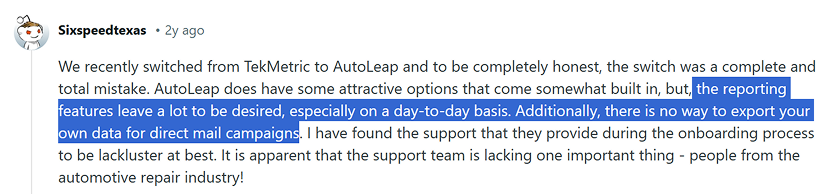
That said, reporting is basic, and shops with complex workflows may feel the constraints. Pricing also comes up as a concern once teams scale.
AutoLeap requires some upfront setup to get the most value. AutoLeap is not for shops looking for heavy accounting or dealership-style controls.
If you’re planning to switch to AutoLeap, consider asking questions about reporting and data export -
3.Tekmetric
Best For: Mid-size repair shops wanting fast workflows, strong parts pricing, and QuickBooks-friendly operations.
Technicians and advisors say it feels quick to use, especially for estimates and parts sourcing. Tekmetric’s parts matrix and labor workflows are seen as daily time savers. Tekmetric gives owners visibility into jobs, technicians, and performance without needing to be physically present.
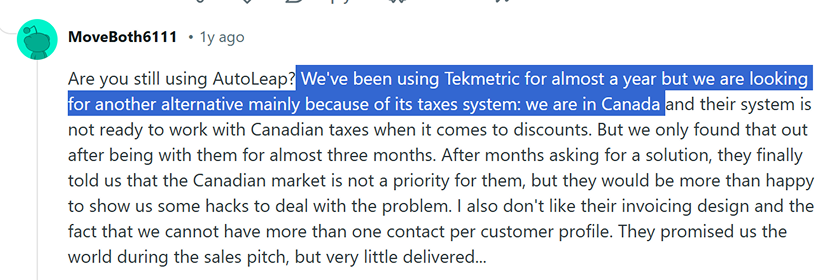
On the downside, some shop owners say reporting flexibility is limited. Custom views and deeper financial breakdowns often require workarounds.
Tekmetric works well for shops that value pace and simplicity, less so for owners who want dealership-level accounting or recon visibility.
Here’s a customer problem that came up in a Reddit discussion -
4. Shopmonkey
Best For: Service-focused repair shops needing scheduling, inspections, and customer messaging without complexity.
Shopmonkey is positioned as an all-in-one shop management system, covering scheduling, invoicing, inspections, and customer communication in one place. Users mention clean screens, easy scheduling, and smooth customer updates, which help keep work orders moving.
Limitations show up for more advanced needs. Inventory tracking is basic, and multi-location reporting can feel limited.
It fits independent service shops that want speed and simplicity, rather than dealers managing recon, inventory, and front-end deals together.
5. Shop-Ware
Best For: High-volume repair shops wanting configurable workflows and detailed service operations control.
Automotive repair management software becomes useful when volume increases. One car is easy to remember. Ten cars in different stages is where breakdowns start. Shop-Ware appeals to shops that like to fine-tune how work moves through the bay. The trade-off is complexity. New users frequently report longer onboarding.
Shop-Ware is less ideal for owners looking for quick setup and more suitable for shops handling higher-value repairs where transparency matters.
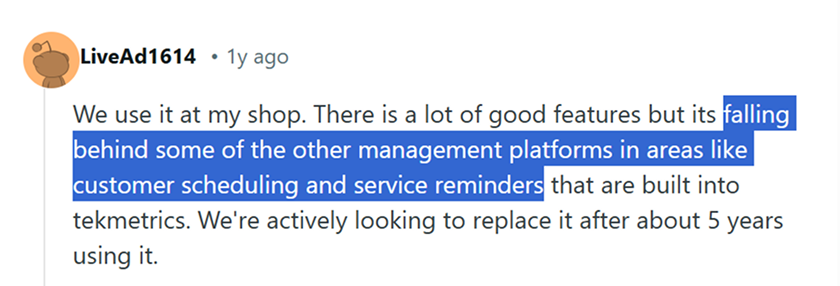
Here is a POV from users on Reddit -
6. Mitchell 1 (Manager SE)
Best For: Established repair shops needing repair data, labor guides, and diagnostic information.
Mitchell 1’s strength is seen in repair procedures, labor times, and wiring diagrams. Many shops run it alongside another system. A vehicle diagnostics software shortens jobs and reduces back-and-forth before approvals.
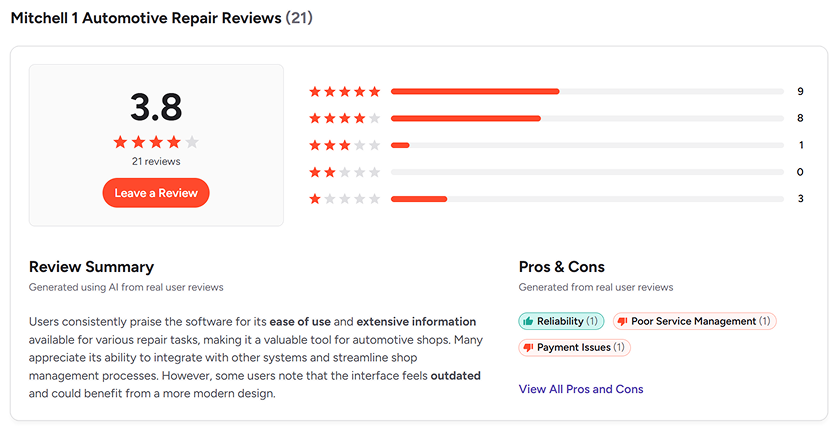
As a daily workflow tool, it can feel dated. Users mention UI friction and reliance on multiple products to cover inspections, billing, and communication. Mitchell 1 works best as a reference backbone, not as the primary system running front-to-back operations.
It’s primarily desktop-based. Remote access is possible, but not as seamless as newer cloud systems. Here’s a snapshot of Mitchell 1’s G2 review summary showing real customer ratings:
7. GaragePlugs by Increminds
Best For: Small garages wanting low-cost scheduling, billing, and basic service records.
GaragePlug is positioned for budget-conscious operators who want to move away from manual updates. It covers core needs like scheduling, billing, and basic service records, which is often enough for smaller setups getting started.
However, limitations show up as soon as operations get busier and job volume increases. The platform lacks the depth needed for more complex service workflows or recon tracking. Support coverage is also mentioned as inconsistent, which can slow things down when issues come up.
GaragePlug works for entry-level needs, but growing repair businesses with multiple bays or technicians usually need more structure.
Here are some noteworthy review excerpts of GaragePlug on G2:

8. AutoFluent by TABS
Best For: Long-running / Legacy repair shops comfortable with traditional desktop-style workflows.
TABS has a loyal user base, especially among shops that have used it for years. Legacy users rely on it for core functions like invoicing, labor lines, and customer history.
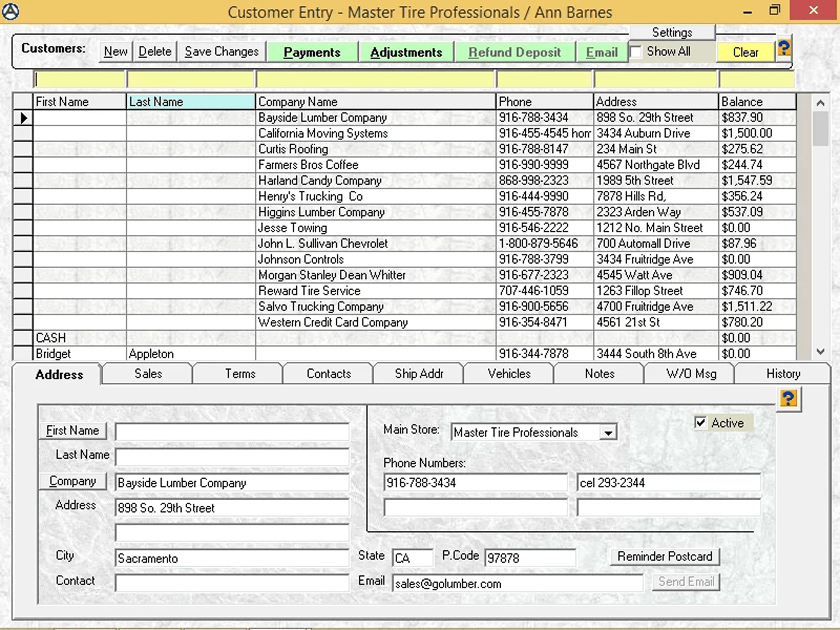
The interface feels dated, and lack of cloud capability is a common complaint. Cloud-based vs. on-premise auto repair software decision becomes important when desktop systems access limits decisions. Being tied to one machine slows response and visibility. New users often report onboarding friction compared to newer systems. TABS fits shops that value familiarity, not teams seeking modern workflows or mobile-friendly usage. As a result, it is not as widely adopted as newer cloud platforms.
Here’s a preview of their UI screen -
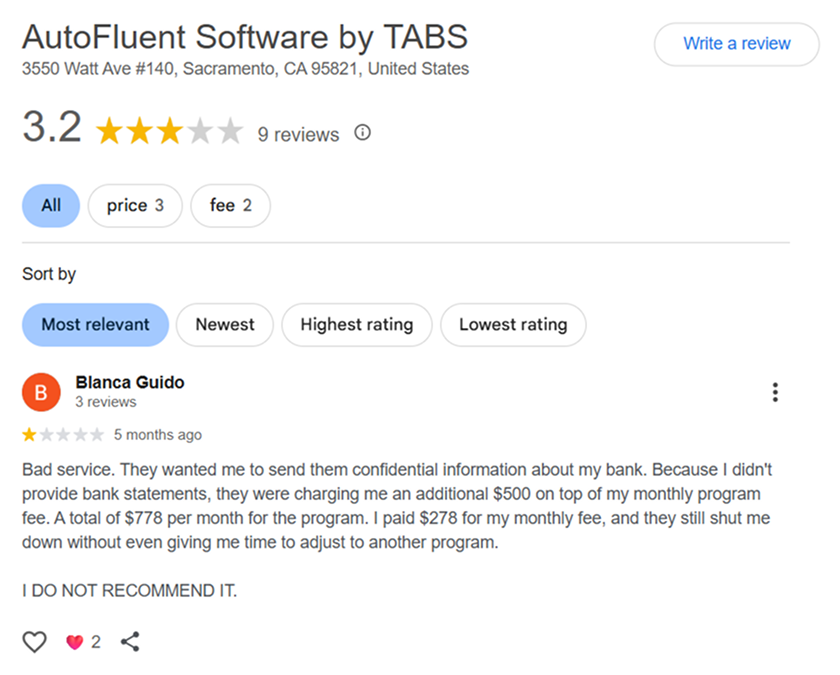
However, it's important to do some basic diligence beyond the 5-star reviews and notable product features -
9. RepairShopr
Best For: Small to mid-size shops wanting tickets, invoicing, and basic CRM in one system.
RepairShopr gets credit for flexibility. It handles tickets, customer history, and simple invoicing without heavy setup. It’s often adopted by owner-operators who want control without layers of process.
Trade-offs show up as shops grow. Reporting depth is limited, and inventory handling can feel manual. Some users feel that the interface feels dated compared to newer tools.
RepairShopr suits lean shops that want structure without overhead, not high-volume dealers tracking recon. It works for shops with simpler needs.
10. Fullbay
Best For: Truck and diesel repair shops handling parts, labor, and compliance records.
Fullbay is designed specifically for heavy-duty and diesel repair shops. It aligns closely with how those shops operate, especially around longer repair cycles and more complex jobs. As a result, it suits diesel and fleet repair environments, not mixed retail or independent car dealers.
Fullbay is praised for handling heavy-duty workflows. It supports work order tracking, inventory visibility, and DOT-focused records. Shops value having service history tied to specific assets. Parts management works best when parts are linked directly to the repair ticket, so costs update as parts arrive.
On the downside, it is not built for light-duty workflows or dealership-style recon. UI feedback is mixed, and some users want more flexibility in reporting.
11. ARI (Auto Repair Software)
Best For: Small shops and mobile mechanics needing simple job tracking and invoicing.
ARI is commonly used by smaller shops and mobile operators who want something they can start using quickly. It covers core needs like job tracking, invoicing, and customer records without heavy setup. Some users also extend it for light fleet maintenance, using it to track multiple vehicles and service schedules.
As operations grow, limitations become more visible. Workflows can feel restrictive for busier shops, and it lacks the depth needed for complex service or recon tracking. ARI fits early-stage operations, not shops managing higher volume or multi-location setups.
Key features to look for in repair shop management software
Automotive repair management software helps manage ops better as volume grows. Managing one or two jobs is easy. Managing ten across inspection, parts, labor, and billing gets tough.
There are many variables to consider while choosing which one will suit your business. Here is an exhaustive list for auto repair software comparison -
1. Job tracking that shows real status
You should see where every car is without asking. For example: inspection pending, waiting on parts, approved, in progress, or ready. When you don’t have the right repair shop software, one missed update turns into three avoidable conversations.
2. Digital vehicle inspections customers understand
Photos, videos, and clear notes reduce pushback. Customers approve faster when they can see the issue themselves instead of hearing it explained over the phone.
3. Labor and time tracking tied to each repair
Hours should flow directly into the job. When labor is logged separately, margins get fuzzy and payroll questions show up later.
4. Parts management connected to work orders
Parts should be ordered, received, and billed from the same job screen. Late or missing parts are one of the biggest causes of stalled bays in US auto repair shops.
5. Real-time parts availability and pricing
Parts management is stronger when supplier availability updates live. Calling vendors or switching tabs wastes time. Seeing price and availability while building the job keeps bays moving.
6. Invoicing that closes jobs cleanly
Invoices should reflect the work done without manual cleanup. Finished cars waiting on billing slow cash flow and frustrate customers at pickup.
7. Centralized customer history
CRM matters when history is visible in one place. Past repairs, declined work, and communication should be attached to the customer and vehicle, not scattered across inboxes. Owners hate calling customers back to fix billing mistakes that should’ve been caught earlier by the auto repair invoicing software.
8. Cloud access for owners and managers
Cloud-based vs. on-premise auto repair software decision becomes important when desktop systems access limits decisions. Being tied to one machine slows response and visibility. US shop owners want visibility without being chained to the office. Cloud-based access matters if you manage remotely or run multiple locations.
9. Reporting that answers daily questions
End-of-day reports should tell you what happened today, not just what happened last month. You should know what you made while decisions still matter.
10. Multi-location visibility from one login
Even if you run one shop today, growth will change your needs fast. Being able to switch between locations without separate logins or reports saves time and avoids blind spots. With cloud-based auto repair software, owners don’t need to be physically present to know what’s happening in the shop.
11. Data protection and recovery
Local systems fail in very real ways. Power surges, hardware crashes, or malware can wipe years of history. Cloud storage matters because recovery should be automatic, not a manual IT exercise after something breaks.
12. Text-based customer communication
US customers respond faster to texts than calls or emails. Status updates, approvals, and invoices should flow through SMS automatically, not depend on manual follow-ups.
Best Auto Repair Shop Software Looks Different for Every Shop
Each shop’s needs vary based on scale and the nature of operations, whether it’s custom repair work or an independent used car dealership.
A small independent auto repair shop has different needs than a growing or multi-location shop. Dealerships that handle inventory or recon also require a different setup.
The goal isn’t to find the most advanced software. It’s to find one that helps your shop move faster, make fewer mistakes, and stay in control as you grow.


.png)

%20isn%E2%80%99t%20as%20Disruptive%20for%20You%20Think.png)